# Agent Skills Standardized the File Format, but Each Harness Still Plays by Its Own Rules
Published: 2026-07-20 · Language: en
Original: https://yage.ai/share/agent-skills-harness-portability-en-20260720.html
Publisher: Superlinear Academy · 100% AI generated
[Article index](https://yage.ai/share/llms.txt)
[Other language](https://yage.ai/share/agent-skills-harness-portability-20260720.html)
## Put release-check in the Project Directory: Which Clients Can Find It?
Suppose you have written a `release-check` Skill to verify the release process and want local AI assistants to invoke it directly. The most straightforward approach is to create `.agents/skills/release-check` in the project root and place the instruction file `SKILL.md`, the Python script `scripts/check_release.py`, and the policy file `references/release_policy.md` inside it.
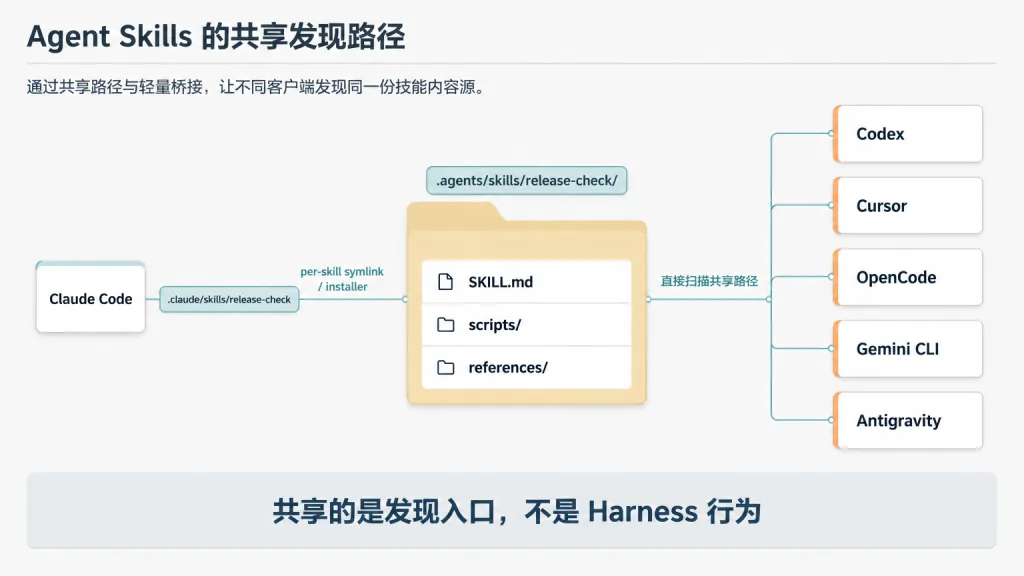
As of July 17, 2026, Codex, Cursor, OpenCode, Gemini CLI, Antigravity 2.0, Antigravity CLI, and Antigravity IDE all scan this shared project-level directory and discover `release-check` there. Claude Code, when used in the same project, does not look for Skills there. Among the mainstream local clients examined in this article, Claude Code is the only exception.
This choice is somewhat surprising. Agent Skills is itself a project initiated and maintained by Anthropic. Anthropic first introduced Skills as a Claude product and API capability on [October 16, 2025](https://docs.anthropic.com/en/release-notes/api#october-16-2025), then released Agent Skills as an open standard on [December 18, 2025](https://www.anthropic.com/news/skills). The project’s official [client implementation guide](https://agentskills.io/client-implementation#where-to-scan) recommends that clients consider scanning the project-level `.agents/skills/` directory in addition to their own dedicated directories, calling it a widely adopted cross-client convention. Cursor and OpenCode have even proactively added support for scanning `.claude/skills/`; Claude Code’s [official documentation](https://code.claude.com/docs/en/skills), however, lists only its dedicated `.claude/skills/` directory, personal directories, and other Claude sources.
A team can keep `.agents/skills/release-check` as the sole source of content and create a symlink under `.claude/skills/` that points to it, or have an installer map it into Claude Code’s directory. Claude Code officially supports symlinks, so there is no need to duplicate the Skill. Either way, however, the project must maintain deployment logic that exists solely for Claude Code. Anthropic’s approach does not violate the [format specification](https://agentskills.io/specification), because the specification does not mandate installation paths, but the additional adaptation work still falls to developers and other tools.
The same release-check Skill is discovered by multiple clients through a shared directory, while Claude Code requires a thin bridge to the same content source
## Finding the Same Skill Does Not Mean Private Fields Will Take Effect
Even once Claude Code can find `release-check`, the compatibility problem remains. Open `SKILL.md`, and another set of differences is hidden in the frontmatter at the top of the file.
The open specification requires the frontmatter to provide `name` and `description`, and also permits the optional fields `license`, `compatibility`, `metadata`, and the experimental `allowed-tools`. Claude Code’s [field reference](https://code.claude.com/docs/en/skills#frontmatter-reference) adds `when_to_use`, `argument-hint`, `arguments`, `disable-model-invocation`, `user-invocable`, `disallowed-tools`, `model`, `effort`, `context`, `agent`, `hooks`, `paths`, and `shell`.
These fields are not ordinary documentation. `model` and `effort` affect how Claude handles a task, while `context` and `agent` control whether it enters a subagent. `paths` can match a Skill by file, and `hooks` executes commands at specified points. `disable-model-invocation: true` prevents Claude from invoking the Skill autonomously, while `disallowed-tools` removes specified tools while the Skill is active. Once authors rely on these settings, they are no longer merely using a generic set of Markdown instructions.
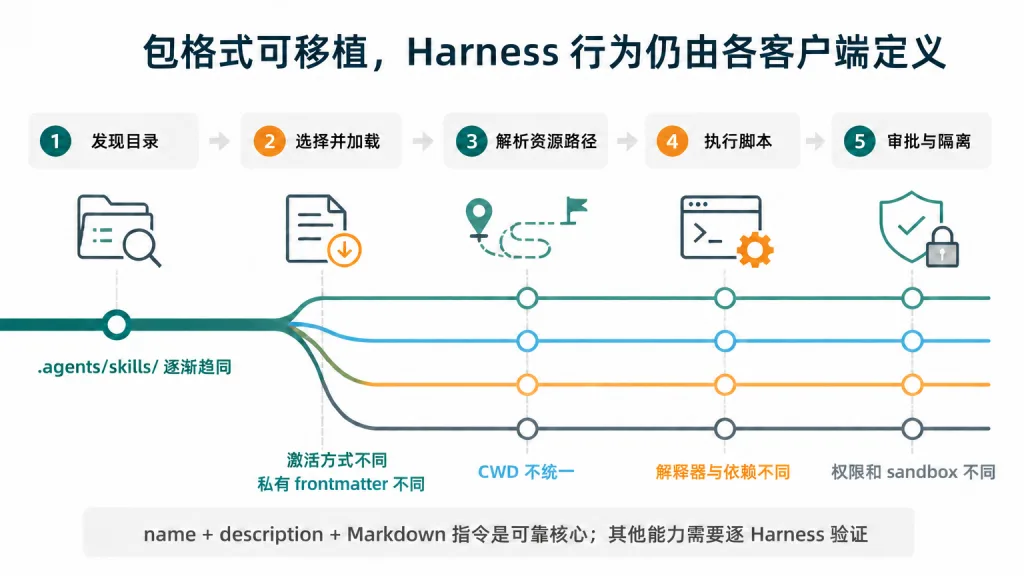
Give the same file to Gemini CLI and it can still read the standard `name` and `description`, but it will not execute the model selection, invocation restrictions, subagent configuration, or hooks expressed by Claude Code’s private fields. A file parsing successfully does not mean those settings have an equivalent implementation. If the correctness of `release-check` depends on `disable-model-invocation` or `disallowed-tools`, the team must re-express those requirements in Gemini CLI’s own policy and permission configuration. Claude frontmatter cannot be treated as a cross-Harness security rule.
Cursor already supports a small subset of Claude fields, including `paths` and `disable-model-invocation`, but this selective adaptation does not mean the ecosystem has reached a consensus on what the fields mean. OpenCode’s public interface also does not promise to enforce these control fields. The same `SKILL.md` may be readable by multiple Harnesses, while invocation timing, model choice, subagents, hooks, and tool restrictions can still differ.
Agent Skills are converging at the discovery layer, but private frontmatter, loading, resource resolution, execution, and permissions are still determined by each client’s Harness
## When Scripts Actually Run, Each Harness Still Follows Its Own Rules
When the model decides to invoke `release-check`, each Harness follows a different process.
In [Gemini CLI](https://geminicli.com/docs/cli/skills), the model can see only the Skill’s name and description when a session begins. After the model requests activation, the terminal first displays the Skill’s instructions and directory access scope and waits for user confirmation. Only after the user consents does Gemini CLI load the body of `SKILL.md` and the directory structure into context.
[OpenCode](https://opencode.ai/docs/skills), by contrast, requires the model to invoke the built-in `skill` tool to read the Skill’s instructions. This action only delivers the document to the model. To subsequently run `check_release.py`, the model must still invoke ordinary shell or file tools and pass the host permission system’s checks.
Google’s products also cannot be collapsed into a single client for discussion. [Gemini CLI](https://geminicli.com/docs/cli/skills), [Antigravity 2.0](https://antigravity.google/docs/skills), [Antigravity CLI](https://antigravity.google/docs/cli/gcli-migration), and [Antigravity IDE](https://antigravity.google/docs/ide/skills) all support the project-level `.agents/skills/` directory, but their global directories and loading processes differ. Antigravity CLI currently has the agent read `SKILL.md` with ordinary file tools rather than following Gemini CLI’s `activate_skill` process.
Scripts inside a Skill amplify these differences. When `scripts/check_release.py` runs, it may also need to read `references/release_policy.md`. Agent Skills does not specify the working directory from which a Harness launches Python, nor does it standardize tool names such as `Read`, `Bash`, `view_file`, or `run_shell_command`. A script should use `__file__` to locate its own Skill directory and then find reference files from there. `SKILL.md` should likewise describe actions such as “read the file” or “execute the script” rather than assume that every Harness provides tools with the same names.
The experimental `allowed-tools` field in the specification also cannot replace each Harness’s own security configuration. Codex’s approval and sandbox, Gemini CLI’s policy engine, OpenCode’s tool permissions, and Antigravity’s permission rules all operate independently of the Skill format. After the model receives the Skill’s instructions, whether the script can execute, what it can access, and whether user confirmation is required remain decisions for the current Harness.
## A Custom Harness Must Also Supply Its Own Execution and Security Policies
Developers who want to use these Skills in their own agent frameworks must implement the parts beyond the format themselves.
The [OpenAI Responses API guide to Skills](https://developers.openai.com/api/docs/guides/tools-skills) provides one example: hosted shell accepts an uploaded, versioned `skill_reference`, while local shell relies on the caller to provide a local path. The API does not automatically scan `.agents/skills/` simply because it exists in the caller’s code repository.
[Microsoft Agent Skills for Python](https://learn.microsoft.com/en-us/agent-framework/agents/skills) states this division of responsibilities even more directly. `FileSkillsSource` reads a Skill from a local directory, `SkillsProvider` provides its description to the model, and `SkillScriptRunner` launches the associated Python script. They solve the problem of getting a Skill into a Python Agent, but they do not decide for the application which directories to scan, how to prepare dependencies, where to run scripts, when to request user authorization, or how to restrict file and network access.
To make `release-check` work across multiple clients, a team can maintain one restrained core Skill and add thin adaptations for each target Harness. `name` and `description` are reliable common fields. Other optional standard fields may remain, but they cannot carry critical cross-Harness controls. The body should describe steps in terms of generic actions, scripts should resolve resources relative to their own locations, and dependency and environment requirements should be stated explicitly. Claude Code’s directory mapping, Cursor’s path-based triggers, and the API’s uploaded version should each remain in their respective adaptation layers. Finally, discovery, resource access, script execution, and default permissions should be tested in every Harness actually in use.