OpenClaw went absolutely viral at the end of January 2026. Social media was flooded with configuration guides, and cloud service providers rushed to launch one-click deployments, terrified of missing the hype train. Meanwhile, it felt like performance art was happening everywhere: the project changed its name three times in one week—from ClawdBot to MoltBot to OpenClaw. In the process of rebranding, their handle was even hijacked by a token called $CLAWD that scammed people out of $16 million. Security vulnerabilities were popping up left and right, too: 12% of third-party skills contained malicious code, and plenty of people exposed their consoles to the public internet without even setting a password. For a while, the whole space was just a mess of contradictory noise, leaving everyone confused: Should I install this thing? What am I missing if I don't? What are the risks? Is this the next productivity revolution, or just another toy that will be forgotten in two weeks?
In this post, I want to peel back the layers from a higher-level perspective: What did OpenClaw actually get right? Why did it explode? And most importantly—what does this have to do with you?
Why It Went Viral: My Hot Take
I have a bit of a provocative theory: the reason OpenClaw blew up is almost identical to why DeepSeek went viral exactly one year ago.
When DeepSeek first became popular, most AI tools in China were limited to pure chat—no search capabilities, and they hallucinated constantly. While ChatGPT and Claude had reasoning and search features that made them much smarter, they weren't easily accessible in the country. When DeepSeek introduced reasoning and search, it was the first time many people experienced what a thinking, searching AI could do. It was a massive shock to the system: "Wow, AI can actually be THIS useful!" and then—boom—it went viral. In other words, its popularity wasn't necessarily because it was technically superior to its competitors (DeepSeek didn't exactly crush GPT-4o or Claude 3.5 in pure model capability at the time). It went viral because it took something a small circle of early adopters were already enjoying and habituated to, and pushed it right in front of a much larger audience.
OpenClaw is the exact same story. In early 2026, there was a massive gap in the field of Agentic AI. While products like ChatGPT were popular, they were at least a generation behind Agentic AI tools with local permissions like Cursor, Claude Code, or Codex (I’ll explain why later). But tools like Cursor are niche—mostly used by programmers. The general public was still stuck with consumer-grade chat interfaces, feeling like AI hadn't progressed much in the last two years. Then OpenClaw came along and, for the first time, connected those local programming agents with the messaging apps everyone uses every day—WhatsApp, Slack, Lark. It gave non-technical users their first taste of Agentic AI that can read and write files, execute commands, maintain memory, and iterate continuously. It went viral not because it did something brand new technically, but because it democratized an experience previously reserved for a tiny group of techies.
Now, I’m not saying OpenClaw or DeepSeek are just "showy" tools you shouldn't bother with. Quite the opposite. DeepSeek provided a lot of historical inspiration. For example, after the hype died down, who actually benefited? In my observation, it wasn't the people who just jumped on the bandwagon to play with it for a few days. It was the people who understood why it went viral and integrated search and reasoning into their actual workflows. Similarly, while we can go ahead and install OpenClaw and try it out, the tool itself won't magically double your productivity. Viral products are designed for the broadest possible audience, which means they involve a lot of design compromises. Using them as-is is rarely the most efficient way to work. The real value is in understanding the design philosophy behind them, analyzing why they exploded, and applying those lessons to improve your own workflow.
At the end of the day, tools will come and go, but your understanding of their core essence won't. Extracting transferable insights and baking them into your own workflow—that's how the pros do it.
The Chat Interface: Both the Foundation and the Glass Ceiling
Before we dive into why OpenClaw is so powerful, I want to look at a specific example to explain what I mean when I say "OpenClaw is designed for the broadest audience," and how that impacts everything.
As I mentioned earlier, a key reason OpenClaw exploded is that it chose messaging apps we use daily as its interface, rather than requiring you to install yet another piece of software like Cursor. This leverages existing habits and channels, keeping the cognitive barrier to entry incredibly low. You're already on Slack or Lark anyway, so seeing OpenClaw right there makes you want to try it out. Plus, since everyone is already familiar with these apps, the learning curve is pushed practically to zero. No IDE to install, no programming jargon to learn—just pick up your phone and start using it. That’s why it reached such a huge audience.
But if you’ve ever used an Agentic AI programming tool like Cursor, you’ll quickly realize that a Slack-style chat window is actually a very restrictive way for an AI to interact.
First, it forces a linear conversation. Slack and WeChat windows are basically just one message after another. But deep knowledge work is rarely linear. You might need to reference content from another thread, merge two different directions of exploration, or fork off a specific conversation. In desktop environments like Cursor or OpenCode, there are dedicated UI elements for this, but doing it in a chat window feels clunky as hell.
Second, there’s the issue of information density. For toy-level research or quick development, a chat window is fine. But for any meaningful analysis or deep thinking, the information density is embarrassingly low. Trying to read formatted reports, complex tables, or long-form documents inside a chat bubble is pretty painful. Plus, different platforms have wildly inconsistent Markdown support, making the experience very unstable.
The third problem is observability. Especially for multi-step tasks, once I hand over execution to the AI, I naturally want to know what it’s actually doing. Is it making steady progress, or is it spinning its wheels in a dead-end loop? Which tools did it call? Which files did it change? In Cursor and similar tools, this is presented naturally, but in a chat window, we’re stuck with a "the user is typing..." message or a single emoji. For complex tasks, you’re often left waiting a long time just to be told whether it succeeded or crashed halfway through.
Now, I’m not saying these are "bad" design choices. They are clear trade-offs. If you want to make a tool that’s easy to pick up for everyone, you have to use the tools everyone is already using. But that immediately brings limitations in format and density. It’s a spectrum from "easy but clunky" to "native but niche," and OpenClaw chose extreme ease of use. That’s why it’s a hit. But we have to be clear-eyed about the limitations that decision brings. When you're integrating these tools into your own workflow, don't just mindlessly copy every design choice—find that sweet spot on the trade-off axis that works for your needs.
Once you understand this trade-off, the rest of the analysis becomes much clearer.
The Success Factors Beyond the Interface
The chat interface is what made OpenClaw approachable, but it’s just the surface. What actually makes users feel like this AI is genuinely intelligent, useful, and "gets" them are three core design decisions happening under the hood.
The first is a unified entry point and context. If you compare it to Cursor, the difference is stark. In Cursor, project contexts are isolated—if you open Project A, the AI only knows about A. Switch to Project B, and the conversation about A is gone. Claude Code and OpenCode are the same; they bind to a specific working directory every time you launch. OpenClaw does the exact opposite. By default, it mixes all your conversation contexts into one big pool. You can ask it to organize your emails in Telegram in the morning, write a report in Slack in the afternoon, and schedule your calendar in WhatsApp in the evening—and it remembers everything. It feels incredibly smart, like it actually knows you.
But just dumping everything into one pool isn't enough, because the context window would fill up instantly. That leads to the second key design: Persistent Memory. OpenClaw handles memory very cleverly. At a high level, it uses a file-based memory system much like Manus does. It maintains a SOUL.md to define the AI’s core personality and behavior, a USER.md for your profile, and a MEMORY.md for long-term storage, all on top of the raw daily logs.
The clever bit is its self-maintenance mechanism. Every so often (a "heartbeat"), the AI automatically reviews its recent raw logs, distills valuable info into MEMORY.md, and cleans up outdated entries. This happens entirely in the background without user intervention. This mechanism creates a tiered memory structure: raw logs are short-term, the daily MEMORY.md is medium-term, and the distilled traits/preferences are long-term. For the user, the experience shifts from "I have to explain everything every time" to "It feels like it’s growing with me." That perceived difference is huge.
The third pillar is the rich ecosystem of Skills. This is about so much more than just saving a few minutes of your time. The benefit of adding tools isn’t linear—the jump from 4 to 6 tools adds far more capability than the jump from 2 to 4. Why? Because tools combine. Connecting Slack handles instructions and status reports; image generation handles visuals; a PPT service handles slide decks; deep research handles investigations. When you bundle these together, you get emergent business capabilities and end-to-end applications.
These three designs aren't just additive; they reinforce each other.
Memory combined with a unified context pool creates data interest. Because memory is persistent, conversations accumulate over time; because there’s a unified entry point, data from all sources flows into the same pool. Your work discussions in Slack, your scheduling in Telegram, your personal chats in WhatsApp—all of it merges to form an increasingly complete understanding of you, making every subsequent task more personalized.
Memory combined with Skills brings the ability to self-evolve. Habits learned today are still there tomorrow; as the AI writes and remembers new skills, it enters a positive feedback loop. Its coding ability is particularly noteworthy here. Since OpenClaw can write its own code, if it hits a wall without an existing skill, it can just build one on the fly. That new skill is saved and ready to be reused next time. It’s a closed loop of self-evolution.
And when you add all that power to the ease of use of the interface, you get high usage frequency. The smoother the entry point, the more the flywheel spins, making the AI smarter with every interaction.
In short, OpenClaw is an impressive product. Every decision—technical or otherwise—serves the same flywheel, giving regular people their first real taste of what a fully realized Agentic AI can do.
Limitations and Trade-offs
I’ve spent plenty of time praising OpenClaw, so now it’s time to gripe. But let me be clear: the limitations I’m about to list aren't because the OpenClaw team was sloppy—they are the direct results of that trade-off I mentioned earlier. This is the price you pay for building a viral hit.
I’ve already covered the interface: it's linear, low-density, and offers poor observability. When you move beyond casual use, these bottlenecks become apparent very quickly.
The deeper issues lie in the memory system. OpenClaw’s memory is great for beginners—you don't have to manage it; it just works and evolves. But for anyone trying to turn knowledge into a long-term asset, this is actually a massive hurdle.
For example, say you finish a deep dive research project and produce a 5,000-word report. In a tool like Cursor or a direct file system, that’s a file: docs/research.md. You can @ reference it, version it, or diff it. In OpenClaw, that knowledge is more like human memory—at any point, it might be automatically summarized, rewritten, or even completely "forgotten" (deleted) by the background heartbeat process, and you have zero control over it. It’s hard to tell it: "This document is the absolute source of truth; reference it exactly and do not summarize it into three lines." In short, knowledge cannot be explicitly managed.
Worse, the entire update process is a black box. What gets saved in MEMORY.md, how it’s organized, and when it’s purged is all determined by the AI in secret. You see the result, but you rarely see the "why": What did it change this time? Why did it delete that specific note? Why did it merge those two unrelated thoughts? If something goes wrong, it’s a nightmare to debug and improve.
Another issue with OpenClaw’s unified memory is cross-context interference. While unified memory makes the AI feel like it "knows" you, it also means information can easily pollute different projects. A preference from Project A, or even a one-off temporary decision, might mysteriously start influencing Project B. For a casual user, it seems like it remembers everything; for an advanced user trying to get work done, it feels more like, "Ugh, it’s going off on a tangent again."
Then there are relevant security risks with Skills. Out of the thousands of skills on ClawHub, audits have found hundreds containing malicious code—from crypto theft and reverse shell backdoors to credential stealing. Simon Willison once mentioned a concept called the lethal trifecta: when an AI system has access to private data, is exposed to untrusted environments, and can communicate externally, the risk is amplified exponentially. OpenClaw hits all three🤡. This creates a strange paradox. To get the best experience, you have to give it broad tools and permissions. But that creates security risks, so you feel forced to tighten permissions. But if you tighten them too much, you’re back to a restrictive cloud agent like Manus, losing the magic of a local agent. Safety vs. usability remains a persistent contradiction.
So What?
At this point, you might be asking: "Okay, that was a lot of analysis—so what? How does this help me?"
Here’s the answer: you can take these insights and build something for yourself that’s actually better and more tailored than OpenClaw. That’s exactly what I did, and the results have been much better than using OpenClaw directly. Let me walk you through a few key decisions I made.
Reuse the Agentic Loop, Don’t Rebuild It
The first—and most important—decision we made was to not build an Agentic AI system from scratch. Instead, we reused an existing open-source CLI programming tool like OpenCode as our foundation.
There’s a deep reasoning behind this. Building a functional Agentic Loop—the cycle of calling an API, parsing tool calls, executing them, returning results to the AI, and requesting the next step—sounds simple on paper. But making it robust enough for real-world use is full of pitfalls: file system I/O, partial file edits, sandbox environments, permission management... the list goes on. Building these things is tedious, risky, and doesn’t actually create much unique value for the end user. I discussed this in detail in a previous post—my core point was that the Agentic Loop is "grunt work" that should be outsourced. What’s actually worth your time is the Agentic Architecture—how you inject business logic into the AI system to create direct value.
Tools like OpenCode or Claude Code are basically perfect "outsourcing" options. They’ve already matured the Agentic Loop—they can read and write files, run commands, and iterate continuously, and they’re evolving incredibly fast. By using them as a cornerstone, you’re basically getting a free ride on the entire agentic programming toolchain, which drops your development costs to almost zero. Choosing OpenCode specifically has extra perks: it’s fully open-source (so you can hack it), it supports parallel subagents (something Cursor and Codex still don’t have), and it supports multiple coding plans. For instance, I use the GLM coding plan, but you could use the OpenAI Codex plan directly without the insane costs of raw API calls.
File as Memory: Inheriting and Evolving the OpenClaw Philosophy
The second decision was about the memory system. Tools like OpenCode or Claude Code have a natural "disk-as-memory" philosophy—after all, files are the basic unit they handle. Having disk-based memory, combined with direct ownership and transparency over those files, solves the exact issues we saw with OpenClaw. If you want to build up long-term assets, write a file. If you want to force the AI to follow certain rules, write an AGENTS.md. If you want to manage your memory structure, just edit the Markdown. The problems of non-explicit management and black-box updates are naturally solved by OpenCode’s fine-grained control and the file system itself.
But just having a file system isn't enough, so we also ported over OpenClaw’s "persona self-evolution" mechanism. Specifically, we split memory into two layers: project-level memory (the context, decision logs, and technical specs for a specific project) and persona-level memory (user profile, preferences, and communication style). We then added a persona maintenance workflow to AGENTS.md, so the AI automatically reviews the conversation at the end of a session to update MEMORY.md and USER.md. You get the same self-evolution, but it runs on a fully controllable file system where you can even use Git for version control.
As for the unified context problem, we went with a brute-force but elegant solution: the Mono Repo. By putting different projects in different folders within the same repo, the AI naturally has cross-project access to all contexts. You can isolate when you want, share when you want, merge different lines of exploration, or fork things off just by copying files. These are all native operations in the file system and OpenCode, which feels infinitely more natural than trying to do them in a clunky chat window.
Skills and Security
On the Skills front, the OpenCode ecosystem has a massive array of MCP servers and skills available—calendars, email, browsers, search, you name it. The feature set is pretty much on par with ClawHub. In terms of security, our approach is to not just blindly install third-party skills. Instead, we have the AI review the source code, understand the logic, and then rewrite a "clean" version. In the age of AI-assisted coding, this only takes a few minutes, but it drastically reduces the risk of supply chain attacks.
The Last Mile: Mobile
Our first three decisions solved the foundation, memory, and tools, but one key piece was still missing: the entry point. A huge reason OpenClaw is so popular is that you don’t have to be sitting at your computer. But existing programming tools are pretty weak here—VS Code has Code Server, but it’s terrible on an iPad; OpenCode has a web client, but it’s barely functional; Cursor’s web client is tied to GitHub; and Claude Code doesn't even have one.
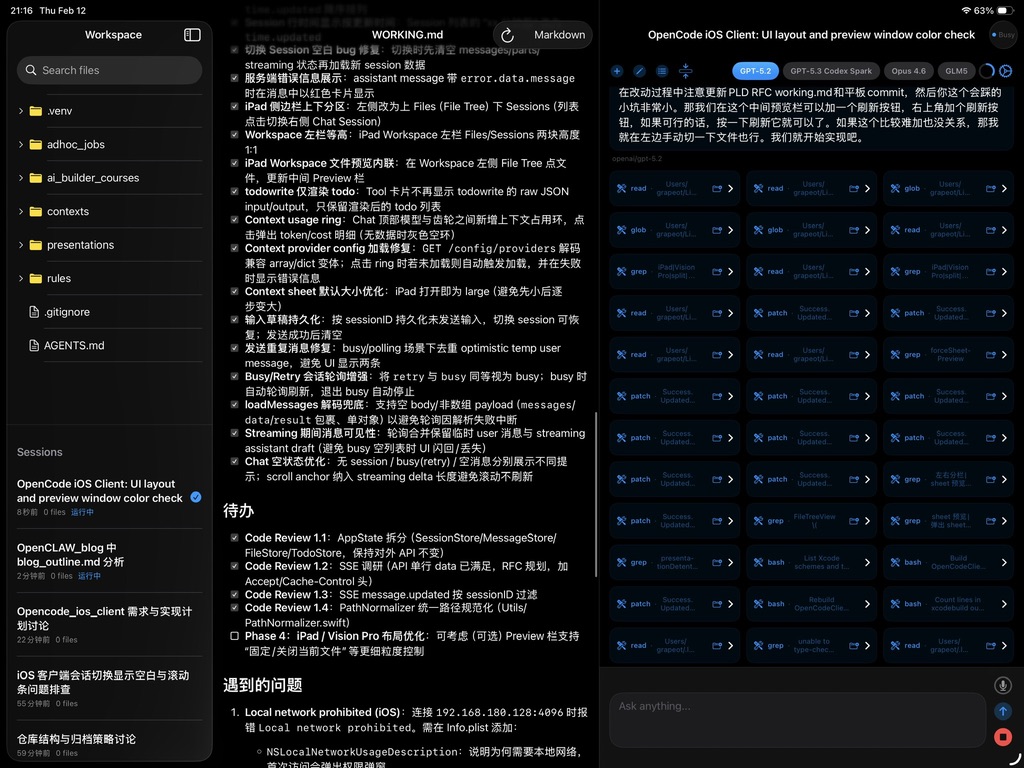
To bridge this gap, we built a native iOS app as a remote client for OpenCode. This isn't just a chat window ported to your phone—it’s a workspace genuinely designed for mobile. You can see the AI’s real-time progress, every tool call, and every file operation. You can switch models for A/B testing, browse Markdown files, review changes, and use voice input. It supports public access via HTTPS or SSH tunnels, and the iPad version even has a three-column split view.
The client is open-sourced on GitHub. Feel free to check it out; it might even hit TestFlight soon. The result is that my dusty iPad is finally a productivity beast again. Directing an AI from the couch is a much, much better experience than using OpenClaw’s chat window. If I get an on-call notification while I'm out for dinner, I can just assign the task to my "AI intern" and have the root cause figured out before the check arrives. And the whole time, I have total control over the AI—I know it isn't going to go rogue or leak my info to Moltbook.
Conclusion
Let's go back to my "hot take" at the beginning. The viral success of both OpenClaw and DeepSeek points to the same underlying truth: it's about taking capabilities a small elite group is already enjoying and pushing them to a broader audience for the first time. DeepSeek gave people their first taste of searching, reasoning AI; OpenClaw gave them their first hands-on experience with an Agentic AI that has disk access, memory, and the power to self-evolve.
But because these products are designed for the masses, they inherently involve massive design compromises. That was true for DeepSeek, and it’s true for OpenClaw. The chat interface brings ease of use but sacrifices expressiveness; unified memory makes the AI feel like it "gets" you but sacrifices control; an open skill ecosystem brings power but introduces security risks.
If you’re already using tools like Cursor, Claude Code, or OpenCode, the takeaway isn't that you should mindlessly install OpenClaw. Instead, you should understand why it’s a hit—the unified entry, the persistent memory, the tool ecosystem, and the flywheel connecting them—and then fold those insights into your own existing toolchain while avoiding the pitfalls. That’s what we did, and I can tell you: the results are significantly better.
At the end of the day, tools will come and go, but your understanding of their core essence won't.